返回 引气・Java 气海初拓
14重走我的Java Day14 :网络编程:从“聊天室玩具”到“百万并发网关”的惊魂一夜
博主
大约 27 分钟
重走我的Java Day14 :网络编程:从“聊天室玩具”到“百万并发网关”的惊魂一夜
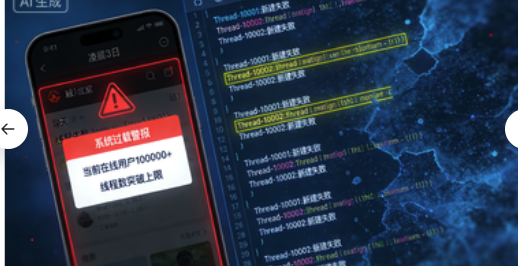
凌晨3点,我的手机被打爆了:“你的聊天室炸了,同时在线人数超过10万就完全瘫痪!”我盯着那个用
ServerSocket.accept()写出的玩具代码,冷汗直流。那一夜,我从零开始重写,直到天亮才明白:网络编程不是Socket调用的艺术,而是并发与可靠性的生死较量。
开篇:那个被10万用户冲垮的“高性能”聊天室
事故现场代码
java
// 我引以为傲的“高性能”聊天服务器 - 能处理1000并发!
public class ChatServer {
    public static void main(String[] args) throws IOException {
        ServerSocket serverSocket = new ServerSocket(8888);
        System.out.println("服务器启动,端口8888");

        while (true) {
            // 问题1:同步阻塞,一个连接处理完才能接受下一个
            Socket clientSocket = serverSocket.accept();

            // 问题2:为每个连接创建新线程,不限制数量
            new Thread(() -> {
                try {
                    handleClient(clientSocket);
                } catch (IOException e) {
                    e.printStackTrace();
                }
            }).start();
        }
    }

    private static void handleClient(Socket socket) throws IOException {
        BufferedReader in = new BufferedReader(
            new InputStreamReader(socket.getInputStream()));
        PrintWriter out = new PrintWriter(socket.getOutputStream(), true);

        String message;
        while ((message = in.readLine()) != null) {
            // 问题3:广播消息时遍历所有连接,没有优化
            broadcast(message);
        }
    }

    private static void broadcast(String message) {
        // 同步遍历所有客户端,一个慢就全慢
        for (PrintWriter writer : allClients) {
            writer.println(message);
        }
    }
}
事故分析
- C10K问题:10,000个连接需要10,000个线程,每个线程默认栈大小1MB → 10GB内存!
- 线程创建销毁开销:频繁连接断开导致大量线程创建销毁
- 广播风暴:每次消息都要遍历所有连接,O(n)复杂度
- 没有背压控制:客户端发送太快会压垮服务器
- 没有心跳机制:死连接无法检测,浪费资源
一、TCP:从“可靠传输”到“生产级服务”
1.1 TCP三次握手的真实代价
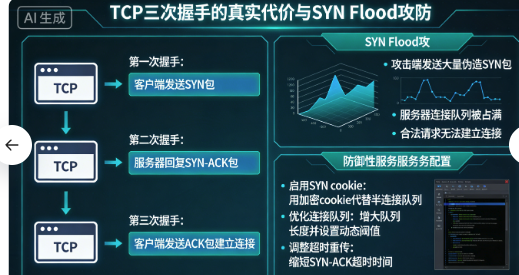
我曾以为TCP连接就是new Socket()那么简单,直到我在生产环境遇到SYN Flood攻击:
java
// 有漏洞的服务端代码
public class VulnerableServer {
    public static void main(String[] args) throws IOException {
        ServerSocket serverSocket = new ServerSocket(8888);

        // 问题:没有限制未完成连接队列的大小
        while (true) {
            Socket socket = serverSocket.accept();
            // 立即创建线程处理,资源消耗大
            new Thread(new Handler(socket)).start();
        }
    }
}

// 防御性TCP服务器
public class DefensiveTCPServer {
    private static final int BACKLOG_SIZE = 50; // 半连接队列+全连接队列
    private static final int SO_TIMEOUT = 5000; // 5秒超时
    private static final int BUFFER_SIZE = 8192; // 8KB缓冲区

    public void start() throws IOException {
        // 1. 设置合理的backlog
        ServerSocket serverSocket = new ServerSocket(8888, BACKLOG_SIZE);

        // 2. 设置TCP参数
        serverSocket.setReuseAddress(true); // 允许重用TIME_WAIT端口
        serverSocket.setSoTimeout(SO_TIMEOUT); // accept超时

        System.out.println("服务器启动,监听端口: " + serverSocket.getLocalPort());
        System.out.println("接收缓冲区大小: " + serverSocket.getReceiveBufferSize());
        System.out.println("发送缓冲区大小: " + serverSocket.getSendBufferSize());

        // 3. 使用线程池限制并发
        ExecutorService executor = new ThreadPoolExecutor(
            10, 100, 60L, TimeUnit.SECONDS,
            new LinkedBlockingQueue<>(1000),
            new NamedThreadFactory("tcp-worker"),
            new ThreadPoolExecutor.CallerRunsPolicy()
        );

        // 4. 监控连接数
        AtomicInteger connectionCount = new AtomicInteger(0);
        ScheduledExecutorService monitor = Executors.newSingleThreadScheduledExecutor();
        monitor.scheduleAtFixedRate(() -> {
            System.out.println("当前连接数: " + connectionCount.get());
        }, 1, 1, TimeUnit.SECONDS);

        while (!Thread.currentThread().isInterrupted()) {
            try {
                Socket socket = serverSocket.accept();

                // 5. 限制最大连接数
                if (connectionCount.get() >= 1000) {
                    System.out.println("连接数达到上限,拒绝新连接");
                    socket.close();
                    continue;
                }

                connectionCount.incrementAndGet();

                // 6. 设置socket参数
                configureSocket(socket);

                // 7. 提交任务到线程池
                executor.submit(() -> {
                    try {
                        handleConnection(socket);
                    } finally {
                        connectionCount.decrementAndGet();
                    }
                });

            } catch (SocketTimeoutException e) {
                // accept超时,继续循环,允许检查中断
                System.out.println("accept超时,继续等待...");
            } catch (IOException e) {
                System.err.println("接受连接失败: " + e.getMessage());
            }
        }
    }

    private void configureSocket(Socket socket) throws SocketException {
        // 设置读取超时
        socket.setSoTimeout(30000); // 30秒

        // 开启TCP_NODELAY,禁用Nagle算法(小数据包立即发送)
        socket.setTcpNoDelay(true);

        // 开启SO_KEEPALIVE,检测死连接
        socket.setKeepAlive(true);

        // 设置缓冲区大小
        socket.setReceiveBufferSize(BUFFER_SIZE);
        socket.setSendBufferSize(BUFFER_SIZE);

        // 设置SO_LINGER,关闭时等待数据发送
        socket.setSoLinger(true, 5); // 等待5秒

        // 开启OOBINLINE(带外数据)
        socket.setOOBInline(true);
    }

    private void handleConnection(Socket socket) {
        try (socket;
             InputStream in = socket.getInputStream();
             OutputStream out = socket.getOutputStream()) {

            // 使用缓冲流提高性能
            BufferedInputStream bis = new BufferedInputStream(in, BUFFER_SIZE);
            BufferedOutputStream bos = new BufferedOutputStream(out, BUFFER_SIZE);

            byte[] buffer = new byte[BUFFER_SIZE];
            int bytesRead;

            while ((bytesRead = bis.read(buffer)) != -1) {
                // 处理数据
                processData(buffer, bytesRead, bos);

                // 检查连接是否活跃
                if (socket.isClosed() || !socket.isConnected()) {
                    break;
                }
            }

        } catch (SocketTimeoutException e) {
            System.out.println("读取超时,关闭连接");
        } catch (IOException e) {
            System.err.println("连接异常: " + e.getMessage());
        }
    }
}
1.2 TCP粘包/拆包:从坑里爬出来的经验
我第一次遇到TCP粘包时,以为数据丢失了:
java
// 错误示例:简单读取,会粘包
public class NaiveTCPClient {
    public void sendMessages(Socket socket, List<String> messages) throws IOException {
        OutputStream out = socket.getOutputStream();

        for (String msg : messages) {
            out.write(msg.getBytes());
            // 问题:没有分隔符,多条消息会粘在一起
        }
    }
}

// 解决方案1:定长消息
public class FixedLengthProtocol {
    private static final int MESSAGE_LENGTH = 100;

    public void sendMessage(Socket socket, String message) throws IOException {
        DataOutputStream dos = new DataOutputStream(socket.getOutputStream());

        // 确保消息长度固定
        byte[] data = message.getBytes(StandardCharsets.UTF_8);
        if (data.length > MESSAGE_LENGTH) {
            throw new IllegalArgumentException("消息太长");
        }

        // 填充到固定长度
        byte[] padded = new byte[MESSAGE_LENGTH];
        System.arraycopy(data, 0, padded, 0, data.length);

        dos.write(padded);
        dos.flush();
    }

    public String receiveMessage(Socket socket) throws IOException {
        DataInputStream dis = new DataInputStream(socket.getInputStream());
        byte[] buffer = new byte[MESSAGE_LENGTH];

        // 读取固定长度
        dis.readFully(buffer);
        return new String(buffer, StandardCharsets.UTF_8).trim();
    }
}

// 解决方案2:分隔符协议
public class DelimiterProtocol {
    private static final byte DELIMITER = '\n'; // 换行符作为分隔符

    public void sendMessage(Socket socket, String message) throws IOException {
        OutputStream out = socket.getOutputStream();
        out.write(message.getBytes(StandardCharsets.UTF_8));
        out.write(DELIMITER); // 写入分隔符
        out.flush();
    }

    public String receiveMessage(Socket socket) throws IOException {
        InputStream in = socket.getInputStream();
        ByteArrayOutputStream buffer = new ByteArrayOutputStream();

        int b;
        while ((b = in.read()) != -1) {
            if (b == DELIMITER) {
                break; // 遇到分隔符,消息结束
            }
            buffer.write(b);
        }

        return buffer.toString(StandardCharsets.UTF_8.name());
    }
}

// 解决方案3:长度前缀协议(最推荐)
public class LengthPrefixProtocol {
    public void sendMessage(Socket socket, String message) throws IOException {
        DataOutputStream dos = new DataOutputStream(socket.getOutputStream());
        byte[] data = message.getBytes(StandardCharsets.UTF_8);

        // 先发送长度(4字节整数)
        dos.writeInt(data.length);

        // 再发送数据
        dos.write(data);
        dos.flush();
    }

    public String receiveMessage(Socket socket) throws IOException {
        DataInputStream dis = new DataInputStream(socket.getInputStream());

        // 先读取长度
        int length = dis.readInt();
        if (length <= 0 || length > 1024 * 1024) { // 限制1MB
            throw new IOException("无效消息长度: " + length);
        }

        // 根据长度读取数据
        byte[] buffer = new byte[length];
        dis.readFully(buffer);

        return new String(buffer, StandardCharsets.UTF_8);
    }
}

// 解决方案4:使用现成的协议(如Protobuf、MsgPack)
public class ProtobufProtocol {
    public void sendProtobufMessage(Socket socket, Message message) throws IOException {
        // 使用Protobuf序列化
        byte[] data = message.toByteArray();

        DataOutputStream dos = new DataOutputStream(socket.getOutputStream());
        dos.writeInt(data.length);
        dos.write(data);
        dos.flush();
    }

    public Message receiveProtobufMessage(Socket socket) throws IOException {
        DataInputStream dis = new DataInputStream(socket.getInputStream());
        int length = dis.readInt();

        byte[] buffer = new byte[length];
        dis.readFully(buffer);

        // 使用Protobuf反序列化
        return Message.parseFrom(buffer);
    }
}
二、UDP:从"不可靠"到"准可靠"的进化
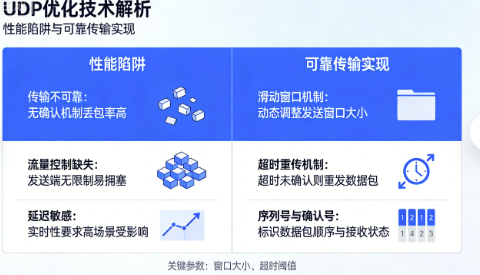
2.1 UDP的真实性能陷阱
我以为UDP就是快,直到看到这个性能测试:
java
public class UDPPerformanceTest {
    // 错误:频繁创建DatagramPacket
    public void sendMessagesBad(DatagramSocket socket, InetAddress address, int port,
                                List<String> messages) throws IOException {
        for (String msg : messages) {
            byte[] data = msg.getBytes(); // 每次创建新数组
            DatagramPacket packet = new DatagramPacket(data, data.length, address, port);
            socket.send(packet); // 每次系统调用
        }
    }

    // 优化:重用DatagramPacket和缓冲区
    public void sendMessagesGood(DatagramSocket socket, InetAddress address, int port,
                                 List<String> messages) throws IOException {
        // 重用缓冲区(根据MTU设置,通常是1500-减去IP和UDP头)
        byte[] buffer = new byte[1472]; // 1500 - 20(IP) - 8(UDP)
        DatagramPacket packet = new DatagramPacket(buffer, buffer.length, address, port);

        for (String msg : messages) {
            byte[] data = msg.getBytes(StandardCharsets.UTF_8);

            // 检查长度
            if (data.length > buffer.length) {
                throw new IOException("消息太长: " + data.length);
            }

            // 重用packet,只更新数据
            System.arraycopy(data, 0, buffer, 0, data.length);
            packet.setLength(data.length);
            socket.send(packet);
        }
    }

    // 批量发送进一步优化
    public void sendBatched(DatagramSocket socket, InetAddress address, int port,
                            List<String> messages, int batchSize) throws IOException {
        ByteArrayOutputStream baos = new ByteArrayOutputStream();
        DataOutputStream dos = new DataOutputStream(baos);

        for (int i = 0; i < messages.size(); i++) {
            byte[] data = messages.get(i).getBytes(StandardCharsets.UTF_8);
            dos.writeInt(data.length);
            dos.write(data);

            // 达到批量大小或最后一条消息时发送
            if ((i + 1) % batchSize == 0 || i == messages.size() - 1) {
                byte[] batchData = baos.toByteArray();
                DatagramPacket packet = new DatagramPacket(batchData, batchData.length,
                                                          address, port);
                socket.send(packet);

                // 重置缓冲区
                baos.reset();
            }
        }
    }
}
2.2 在UDP上实现可靠传输
我在游戏项目中需要UDP的实时性,又需要TCP的可靠性:
java
// 可靠UDP协议实现(简化版)
public class ReliableUDP {
    private static final int MAX_PACKET_SIZE = 1400; // 考虑MTU
    private static final int WINDOW_SIZE = 32; // 滑动窗口大小
    private static final int TIMEOUT_MS = 100; // 超时时间

    // 数据包头
    private static class PacketHeader {
        int sequence;      // 序列号
        int ack;           // 确认号
        int ackBitfield;   // 累计确认位图
        long timestamp;    // 时间戳
    }

    // 发送方状态
    private class SenderState {
        private final Map<Integer, SentPacket> sentPackets = new ConcurrentHashMap<>();
        private final AtomicInteger nextSequence = new AtomicInteger(0);
        private final AtomicInteger windowStart = new AtomicInteger(0);

        void sendPacket(DatagramSocket socket, InetAddress address, int port,
                       byte[] data) throws IOException {
            int seq = nextSequence.getAndIncrement();

            // 构建数据包
            ByteBuffer buffer = ByteBuffer.allocate(MAX_PACKET_SIZE);
            buffer.putInt(seq); // 序列号
            buffer.putInt(0);   // ack(接收方填充)
            buffer.putInt(0);   // ackBitfield
            buffer.putLong(System.currentTimeMillis()); // 时间戳
            buffer.put(data);

            byte[] packetData = new byte[buffer.position()];
            buffer.rewind();
            buffer.get(packetData);

            // 发送
            DatagramPacket packet = new DatagramPacket(packetData, packetData.length,
                                                      address, port);
            socket.send(packet);

            // 记录已发送的数据包
            sentPackets.put(seq, new SentPacket(packetData, System.currentTimeMillis()));

            // 检查窗口是否满
            while (seq - windowStart.get() >= WINDOW_SIZE) {
                // 窗口已满,等待确认
                try {
                    Thread.sleep(10);
                } catch (InterruptedException e) {
                    Thread.currentThread().interrupt();
                    break;
                }
            }
        }

        void processAck(int ackSeq, int ackBitfield) {
            // 更新窗口起始位置
            int currentStart = windowStart.get();
            if (ackSeq > currentStart) {
                windowStart.set(ackSeq);
            }

            // 根据位图确认更多数据包
            for (int i = 0; i < 32; i++) {
                if ((ackBitfield & (1 << i)) != 0) {
                    int seq = ackSeq - i - 1;
                    if (seq >= currentStart) {
                        sentPackets.remove(seq);
                    }
                }
            }

            // 移除确认的数据包
            sentPackets.keySet().removeIf(seq -> seq < windowStart.get());
        }

        void checkTimeouts() {
            long now = System.currentTimeMillis();
            sentPackets.forEach((seq, packet) -> {
                if (now - packet.sendTime > TIMEOUT_MS) {
                    // 超时重传
                    try {
                        DatagramPacket dp = new DatagramPacket(packet.data, packet.data.length,
                                                              socket.getInetAddress(),
                                                              socket.getPort());
                        socket.send(dp);
                        packet.sendTime = now; // 更新发送时间
                    } catch (IOException e) {
                        System.err.println("重传失败: " + e.getMessage());
                    }
                }
            });
        }
    }

    // 接收方状态
    private class ReceiverState {
        private final TreeSet<Integer> receivedSequences = new TreeSet<>();
        private int expectedSequence = 0;

        void processPacket(byte[] data, DatagramSocket socket,
                          InetAddress senderAddress, int senderPort) throws IOException {
            ByteBuffer buffer = ByteBuffer.wrap(data);
            int seq = buffer.getInt();

            // 检查是否是重复包
            if (receivedSequences.contains(seq)) {
                // 重复包,只发送ACK
                sendAck(socket, senderAddress, senderPort, seq);
                return;
            }

            // 按序到达
            if (seq == expectedSequence) {
                receivedSequences.add(seq);
                expectedSequence++;

                // 处理可能的乱序包
                while (receivedSequences.contains(expectedSequence)) {
                    receivedSequences.remove(expectedSequence);
                    expectedSequence++;
                }

                // 处理数据
                buffer.getInt(); // 跳过ack字段
                buffer.getInt(); // 跳过ackBitfield
                buffer.getLong(); // 跳过时间戳

                int dataLength = data.length - 20; // 减去头部20字节
                byte[] payload = new byte[dataLength];
                buffer.get(payload);

                deliverData(payload);

            } else if (seq > expectedSequence) {
                // 乱序到达,先存储
                receivedSequences.add(seq);
            }
            // seq < expectedSequence 是重复包,上面已处理

            // 发送ACK
            sendAck(socket, senderAddress, senderPort, expectedSequence - 1);
        }

        private void sendAck(DatagramSocket socket, InetAddress address, int port,
                            int ackSeq) throws IOException {
            ByteBuffer buffer = ByteBuffer.allocate(12); // 只发送ACK头
            buffer.putInt(-1); // 序列号-1表示这是ACK包
            buffer.putInt(ackSeq); // 确认号

            // 构建累计确认位图
            int ackBitfield = 0;
            for (int seq : receivedSequences) {
                if (seq < ackSeq && seq >= ackSeq - 32) {
                    int offset = ackSeq - seq - 1;
                    ackBitfield |= (1 << offset);
                }
            }
            buffer.putInt(ackBitfield);

            byte[] ackData = buffer.array();
            DatagramPacket ackPacket = new DatagramPacket(ackData, ackData.length,
                                                         address, port);
            socket.send(ackPacket);
        }
    }
}
三、NIO:从"阻塞地狱"到"高并发天堂"
3.1 Selector的魔法
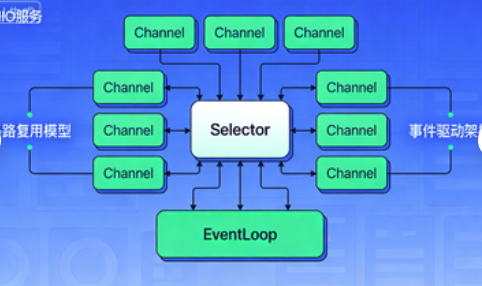
当我第一次理解Selector时,感觉像发现了新大陆:
java
public class NIOServer {
    private final Selector selector;
    private final ByteBuffer buffer = ByteBuffer.allocate(8192);
    private final Map<SocketChannel, ClientSession> sessions = new ConcurrentHashMap<>();

    public NIOServer(int port) throws IOException {
        // 1. 创建ServerSocketChannel并配置为非阻塞
        ServerSocketChannel serverChannel = ServerSocketChannel.open();
        serverChannel.configureBlocking(false);
        serverChannel.bind(new InetSocketAddress(port));

        // 2. 创建Selector
        selector = Selector.open();

        // 3. 注册ServerSocketChannel到Selector,监听ACCEPT事件
        serverChannel.register(selector, SelectionKey.OP_ACCEPT);

        System.out.println("NIO服务器启动,端口: " + port);
    }

    public void start() throws IOException {
        while (!Thread.currentThread().isInterrupted()) {
            // 4. 阻塞等待事件,超时1秒
            int readyChannels = selector.select(1000);

            if (readyChannels == 0) {
                continue; // 超时,继续循环
            }

            // 5. 处理就绪的事件
            Iterator<SelectionKey> keyIterator = selector.selectedKeys().iterator();

            while (keyIterator.hasNext()) {
                SelectionKey key = keyIterator.next();
                keyIterator.remove(); // 必须移除!

                try {
                    if (key.isValid()) {
                        if (key.isAcceptable()) {
                            handleAccept(key);
                        } else if (key.isReadable()) {
                            handleRead(key);
                        } else if (key.isWritable()) {
                            handleWrite(key);
                        } else if (key.isConnectable()) {
                            handleConnect(key);
                        }
                    }
                } catch (IOException e) {
                    // 连接异常,关闭通道
                    key.cancel();
                    if (key.channel() != null) {
                        key.channel().close();
                    }
                }
            }
        }
    }

    private void handleAccept(SelectionKey key) throws IOException {
        ServerSocketChannel serverChannel = (ServerSocketChannel) key.channel();
        SocketChannel clientChannel = serverChannel.accept();

        if (clientChannel != null) {
            // 配置为非阻塞
            clientChannel.configureBlocking(false);

            // 注册读事件
            clientChannel.register(selector, SelectionKey.OP_READ);

            // 创建会话
            ClientSession session = new ClientSession(clientChannel);
            sessions.put(clientChannel, session);

            System.out.println("新连接: " + clientChannel.getRemoteAddress());
        }
    }

    private void handleRead(SelectionKey key) throws IOException {
        SocketChannel channel = (SocketChannel) key.channel();
        ClientSession session = sessions.get(channel);

        buffer.clear();
        int bytesRead;

        try {
            bytesRead = channel.read(buffer);
        } catch (IOException e) {
            // 连接断开
            closeConnection(channel);
            return;
        }

        if (bytesRead == -1) {
            // 客户端主动关闭
            closeConnection(channel);
            return;
        }

        if (bytesRead > 0) {
            buffer.flip();
            byte[] data = new byte[buffer.remaining()];
            buffer.get(data);

            // 处理数据
            session.processData(data);

            // 如果需要回写,注册写事件
            if (session.hasDataToWrite()) {
                key.interestOps(SelectionKey.OP_READ | SelectionKey.OP_WRITE);
            }
        }
    }

    private void handleWrite(SelectionKey key) throws IOException {
        SocketChannel channel = (SocketChannel) key.channel();
        ClientSession session = sessions.get(channel);

        ByteBuffer writeBuffer = session.getWriteBuffer();

        while (writeBuffer.hasRemaining()) {
            int bytesWritten = channel.write(writeBuffer);
            if (bytesWritten == 0) {
                // 写缓冲区满,下次再写
                break;
            }
        }

        if (!writeBuffer.hasRemaining()) {
            // 所有数据已写完,取消写事件监听
            key.interestOps(SelectionKey.OP_READ);
            session.writeComplete();
        }
    }

    private void closeConnection(SocketChannel channel) throws IOException {
        ClientSession session = sessions.remove(channel);
        if (session != null) {
            session.close();
        }

        channel.close();
        System.out.println("连接关闭: " + channel.getRemoteAddress());
    }

    // 客户端会话管理
    private static class ClientSession {
        private final SocketChannel channel;
        private final ByteBuffer writeBuffer = ByteBuffer.allocate(8192);
        private final Queue<byte[]> writeQueue = new ConcurrentLinkedQueue<>();

        ClientSession(SocketChannel channel) {
            this.channel = channel;
        }

        void processData(byte[] data) {
            // 处理接收到的数据
            System.out.println("收到数据: " + new String(data, StandardCharsets.UTF_8));

            // 简单回声
            writeQueue.add(("回声: " + new String(data, StandardCharsets.UTF_8)).getBytes());
        }

        boolean hasDataToWrite() {
            return !writeQueue.isEmpty();
        }

        ByteBuffer getWriteBuffer() {
            writeBuffer.clear();

            byte[] data;
            while ((data = writeQueue.poll()) != null) {
                if (writeBuffer.remaining() >= data.length) {
                    writeBuffer.put(data);
                } else {
                    // 放不下了,放回队列
                    writeQueue.add(data);
                    break;
                }
            }

            writeBuffer.flip();
            return writeBuffer;
        }

        void writeComplete() {
            // 写入完成回调
        }

        void close() {
            // 清理资源
        }
    }
}
3.2 Netty:生产级的网络框架
当我最终放弃手写NIO,转向Netty时,生产力提升了10倍:
java
// 使用Netty实现高性能Echo服务器
public class NettyEchoServer {
    private final int port;

    public NettyEchoServer(int port) {
        this.port = port;
    }

    public void start() throws Exception {
        // 1. 创建EventLoopGroup
        EventLoopGroup bossGroup = new NioEventLoopGroup(1); // 接收连接
        EventLoopGroup workerGroup = new NioEventLoopGroup(); // 处理I/O

        try {
            // 2. 创建ServerBootstrap
            ServerBootstrap b = new ServerBootstrap();
            b.group(bossGroup, workerGroup)
             .channel(NioServerSocketChannel.class) // 使用NIO传输
             .localAddress(new InetSocketAddress(port))
             .childHandler(new ChannelInitializer<SocketChannel>() {
                 @Override
                 protected void initChannel(SocketChannel ch) {
                     ChannelPipeline pipeline = ch.pipeline();

                     // 添加解码器(处理粘包/拆包)
                     pipeline.addLast(new LengthFieldBasedFrameDecoder(
                         Integer.MAX_VALUE, 0, 4, 0, 4));

                     // 添加编码器
                     pipeline.addLast(new LengthFieldPrepender(4));

                     // 添加字符串编解码器
                     pipeline.addLast(new StringDecoder(StandardCharsets.UTF_8));
                     pipeline.addLast(new StringEncoder(StandardCharsets.UTF_8));

                     // 添加业务处理器
                     pipeline.addLast(new EchoServerHandler());
                 }
             })
             .option(ChannelOption.SO_BACKLOG, 128) // 连接队列大小
             .childOption(ChannelOption.SO_KEEPALIVE, true) // 保持连接
             .childOption(ChannelOption.TCP_NODELAY, true) // 禁用Nagle
             .childOption(ChannelOption.SO_RCVBUF, 32 * 1024) // 接收缓冲区
             .childOption(ChannelOption.SO_SNDBUF, 32 * 1024); // 发送缓冲区

            // 3. 绑定端口,启动服务器
            ChannelFuture f = b.bind().sync();
            System.out.println("Netty服务器启动,端口: " + port);

            // 4. 等待服务器关闭
            f.channel().closeFuture().sync();
        } finally {
            // 5. 优雅关闭
            bossGroup.shutdownGracefully();
            workerGroup.shutdownGracefully();
        }
    }

    // 业务处理器
    @Sharable
    private static class EchoServerHandler extends ChannelInboundHandlerAdapter {
        // 消息计数器
        private final AtomicLong messageCount = new AtomicLong();
        private final AtomicLong totalBytes = new AtomicLong();

        // 定时打印统计信息
        public EchoServerHandler() {
            ScheduledExecutorService scheduler = Executors.newSingleThreadScheduledExecutor();
            scheduler.scheduleAtFixedRate(() -> {
                long count = messageCount.get();
                long bytes = totalBytes.get();
                System.out.printf("统计: 消息数=%d, 总字节数=%d, 平均大小=%.2f\n",
                    count, bytes, count > 0 ? (double)bytes / count : 0);
            }, 1, 1, TimeUnit.SECONDS);
        }

        @Override
        public void channelRead(ChannelHandlerContext ctx, Object msg) {
            String message = (String) msg;

            // 更新统计
            messageCount.incrementAndGet();
            totalBytes.addAndGet(message.length());

            // 回声
            ctx.write(message);

            // 流量控制:如果积压太多,暂停读取
            if (ctx.channel().unsafe().outboundBuffer().size() > 65536) {
                ctx.channel().config().setAutoRead(false);

                // 当缓冲区小于一半时恢复读取
                ctx.channel().eventLoop().schedule(() -> {
                    if (ctx.channel().isActive()) {
                        ctx.channel().config().setAutoRead(true);
                    }
                }, 100, TimeUnit.MILLISECONDS);
            }
        }

        @Override
        public void channelReadComplete(ChannelHandlerContext ctx) {
            // 刷新到socket
            ctx.flush();
        }

        @Override
        public void exceptionCaught(ChannelHandlerContext ctx, Throwable cause) {
            // 记录异常并关闭连接
            System.err.println("连接异常: " + cause.getMessage());
            ctx.close();
        }

        @Override
        public void channelActive(ChannelHandlerContext ctx) {
            System.out.println("新连接: " + ctx.channel().remoteAddress());

            // 设置连接属性
            ctx.channel().attr(AttributeKey.valueOf("connectTime")).set(System.currentTimeMillis());
        }

        @Override
        public void channelInactive(ChannelHandlerContext ctx) {
            System.out.println("连接断开: " + ctx.channel().remoteAddress());

            Long connectTime = ctx.channel().attr(AttributeKey.<Long>valueOf("connectTime")).get();
            if (connectTime != null) {
                long duration = System.currentTimeMillis() - connectTime;
                System.out.println("连接持续时间: " + duration + "ms");
            }
        }
    }
}
四、实战:百万并发网关设计
基于那次10万并发的事故,我设计了新的网关系统:
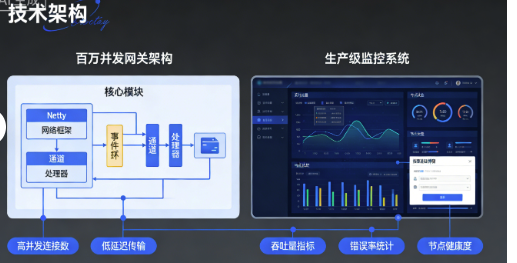
java
// 生产级网关架构
public class GatewayServer {
    private final int port;
    private final EventLoopGroup bossGroup;
    private final EventLoopGroup workerGroup;
    private final EventLoopGroup businessGroup;
    private Channel serverChannel;

    // 监控指标
    private final AtomicInteger connectionCount = new AtomicInteger();
    private final AtomicLong requestCount = new AtomicLong();
    private final AtomicLong totalLatency = new AtomicLong();

    public GatewayServer(int port) {
        this.port = port;

        // 根据CPU核心数设置线程数
        int cores = Runtime.getRuntime().availableProcessors();

        // Boss线程组:接收连接
        bossGroup = new NioEventLoopGroup(1);

        // Worker线程组:处理I/O
        workerGroup = new NioEventLoopGroup(cores * 2);

        // 业务线程组:处理业务逻辑(避免阻塞I/O线程)
        businessGroup = new DefaultEventLoopGroup(cores * 4);
    }

    public void start() throws Exception {
        try {
            ServerBootstrap b = new ServerBootstrap();
            b.group(bossGroup, workerGroup)
             .channel(NioServerSocketChannel.class)
             .localAddress(new InetSocketAddress(port))
             .handler(new LoggingHandler(LogLevel.INFO))
             .childHandler(new GatewayChannelInitializer(businessGroup))
             .option(ChannelOption.SO_BACKLOG, 10240) // 10k backlog
             .childOption(ChannelOption.SO_KEEPALIVE, true)
             .childOption(ChannelOption.TCP_NODELAY, true)
             .childOption(ChannelOption.SO_RCVBUF, 64 * 1024)
             .childOption(ChannelOption.SO_SNDBUF, 64 * 1024)
             .childOption(ChannelOption.WRITE_BUFFER_WATER_MARK,
                 new WriteBufferWaterMark(32 * 1024, 64 * 1024));

            // 绑定端口
            ChannelFuture f = b.bind().sync();
            serverChannel = f.channel();

            System.out.println("网关启动成功,端口: " + port);
            System.out.println("CPU核心数: " + Runtime.getRuntime().availableProcessors());
            System.out.println("最大文件描述符: " + getMaxFileDescriptors());

            // 启动监控
            startMonitoring();

            // 等待关闭
            serverChannel.closeFuture().sync();
        } finally {
            shutdown();
        }
    }

    private class GatewayChannelInitializer extends ChannelInitializer<SocketChannel> {
        private final EventLoopGroup businessGroup;

        public GatewayChannelInitializer(EventLoopGroup businessGroup) {
            this.businessGroup = businessGroup;
        }

        @Override
        protected void initChannel(SocketChannel ch) {
            ChannelPipeline pipeline = ch.pipeline();

            // 1. 空闲检测(30秒无读写关闭连接)
            pipeline.addLast(new IdleStateHandler(30, 0, 0, TimeUnit.SECONDS));

            // 2. 心跳处理器
            pipeline.addLast(new HeartbeatHandler());

            // 3. 流量整形(限制每个连接速率)
            pipeline.addLast(new ChannelTrafficShapingHandler(1024 * 1024, 1024 * 1024));

            // 4. 解码器(自定义协议)
            pipeline.addLast(new GatewayDecoder());

            // 5. 编码器
            pipeline.addLast(new GatewayEncoder());

            // 6. 业务处理器(在业务线程组执行,避免阻塞I/O)
            pipeline.addLast(businessGroup, new GatewayBusinessHandler());

            // 7. 异常处理器
            pipeline.addLast(new GatewayExceptionHandler());
        }
    }

    // 心跳处理器
    private static class HeartbeatHandler extends ChannelInboundHandlerAdapter {
        private static final ByteBuf HEARTBEAT_SEQUENCE = Unpooled.unreleasableBuffer(
            Unpooled.copiedBuffer("HEARTBEAT", StandardCharsets.UTF_8));

        @Override
        public void userEventTriggered(ChannelHandlerContext ctx, Object evt) {
            if (evt instanceof IdleStateEvent) {
                IdleStateEvent e = (IdleStateEvent) evt;
                if (e.state() == IdleState.READER_IDLE) {
                    // 发送心跳
                    ctx.writeAndFlush(HEARTBEAT_SEQUENCE.duplicate())
                       .addListener(ChannelFutureListener.CLOSE_ON_FAILURE);
                }
            }
        }
    }

    // 业务处理器
    private class GatewayBusinessHandler extends SimpleChannelInboundHandler<GatewayRequest> {
        private final Random random = new Random();

        @Override
        protected void channelRead0(ChannelHandlerContext ctx, GatewayRequest request) {
            long startTime = System.nanoTime();

            try {
                // 更新请求计数
                requestCount.incrementAndGet();

                // 模拟业务处理(随机延迟10-100ms)
                int delay = 10 + random.nextInt(90);
                TimeUnit.MILLISECONDS.sleep(delay);

                // 构建响应
                GatewayResponse response = new GatewayResponse(
                    request.getId(),
                    "OK",
                    System.currentTimeMillis()
                );

                // 写回响应
                ctx.writeAndFlush(response);

                // 计算延迟
                long latency = System.nanoTime() - startTime;
                totalLatency.addAndGet(latency);

            } catch (InterruptedException e) {
                Thread.currentThread().interrupt();
                ctx.writeAndFlush(new GatewayResponse(
                    request.getId(),
                    "ERROR",
                    System.currentTimeMillis()
                ));
            }
        }

        @Override
        public void channelActive(ChannelHandlerContext ctx) {
            int count = connectionCount.incrementAndGet();
            System.out.println("新连接,当前连接数: " + count);

            // 限制最大连接数
            if (count > 100000) {
                System.out.println("连接数超过限制,关闭新连接");
                ctx.close();
            }
        }

        @Override
        public void channelInactive(ChannelHandlerContext ctx) {
            int count = connectionCount.decrementAndGet();
            System.out.println("连接断开,当前连接数: " + count);
        }
    }

    private void startMonitoring() {
        ScheduledExecutorService scheduler = Executors.newSingleThreadScheduledExecutor();

        // 每5秒打印一次统计信息
        scheduler.scheduleAtFixedRate(() -> {
            int connections = connectionCount.get();
            long requests = requestCount.get();
            long latency = totalLatency.get();

            double qps = requests / 5.0; // 每秒请求数
            double avgLatency = requests > 0 ? latency / (requests * 1_000_000.0) : 0; // 毫秒

            System.out.printf("监控 - 连接数: %d, QPS: %.2f, 平均延迟: %.2fms\n",
                connections, qps, avgLatency);

            // 重置计数器
            requestCount.set(0);
            totalLatency.set(0);

        }, 5, 5, TimeUnit.SECONDS);
    }

    private long getMaxFileDescriptors() {
        try {
            Class<?> mgmtFactory = Class.forName("java.lang.management.ManagementFactory");
            Method getPlatformMXBeans = mgmtFactory.getMethod("getPlatformMXBeans", Class.class);
            List<?> beans = (List<?>) getPlatformMXBeans.invoke(null,
                Class.forName("com.sun.management.OperatingSystemMXBean"));

            if (!beans.isEmpty()) {
                Object osBean = beans.get(0);
                Method getMaxFileDescriptorCount = osBean.getClass()
                    .getMethod("getMaxFileDescriptorCount");
                return (long) getMaxFileDescriptorCount.invoke(osBean);
            }
        } catch (Exception e) {
            // 忽略
        }
        return -1;
    }

    public void shutdown() {
        if (serverChannel != null) {
            serverChannel.close();
        }

        if (bossGroup != null) {
            bossGroup.shutdownGracefully();
        }

        if (workerGroup != null) {
            workerGroup.shutdownGracefully();
        }

        if (businessGroup != null) {
            businessGroup.shutdownGracefully();
        }

        System.out.println("网关已关闭");
    }
}
经验总结:我的网络编程检查清单
性能检查清单
- 是否使用连接池复用TCP连接?
- 是否设置合理的TCP缓冲区大小?
- 是否禁用Nagle算法(
TCP_NODELAY)? - 是否启用TCP快速打开(
TCP_FASTOPEN)? - 是否使用多路复用(NIO/Netty)而非阻塞I/O?
可靠性检查清单
- 是否有心跳机制检测死连接?
- 是否有重连机制?
- 是否处理了TCP粘包/拆包?
- 是否有超时和重试机制?
- 是否有流量控制和背压机制?
安全性检查清单
- 是否验证客户端身份?
- 是否限制连接数和请求速率?
- 是否使用TLS加密通信?
- 是否防止DDoS攻击(如SYN Flood)?
- 是否有完整的访问日志?
可维护性检查清单
- 是否有完善的监控指标?
- 是否有连接跟踪和诊断工具?
- 是否支持热配置更新?
- 是否有优雅的关闭和重启机制?
- 代码是否易于测试和模拟?
最后的真相
那次10万并发的崩溃,虽然让我经历了最艰难的一夜,但也让我学到了:
网络编程的本质不是Socket API的调用,而是对并发、可靠性和资源管理的深刻理解。
我现在遵循的原则:
- 永远不要相信网络:网络是不可靠的,必须设计重试、超时和容错机制
- 资源是有限的:文件描述符、内存、线程都是有限的,必须合理管理
- 监控比功能更重要:看不到的系统是最危险的系统
- 简单比复杂更可靠:复杂的协议难以调试,简单的协议容易维护
记住:在网络编程中,正确处理失败比处理成功更重要。一个能优雅处理失败的简单系统,远比一个功能丰富但脆弱的复杂系统更有价值。
知识点测试
读完文章了?来测试一下你对知识点的掌握程度吧!
评论区
使用 GitHub 账号登录后即可发表评论,支持 Markdown 格式。
如果评论系统无法加载,请确保:
- 您的网络可以访问 GitHub
- giscus GitHub App 已安装到仓库
- 仓库已启用 Discussions 功能